
DOCX vs PDF: When to Use Each Format - Complete Guide 2025
Understand the key differences between DOCX and PDF formats. Learn when to use each format for maximum efficiency in your workflow and document management.
DocxToPDF Team
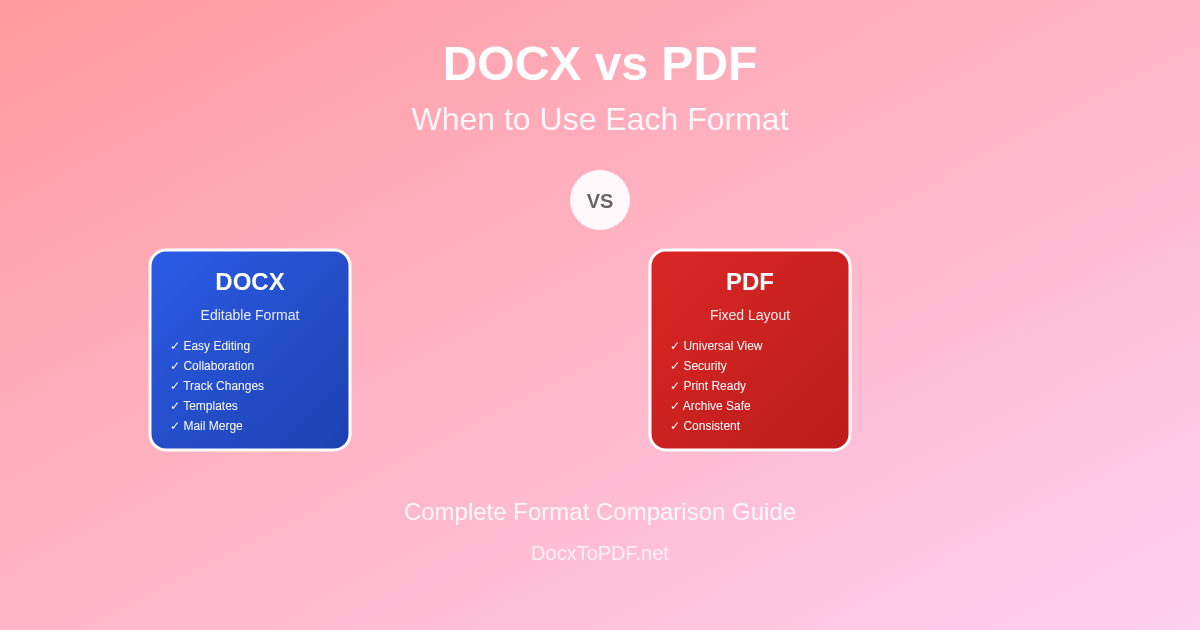
DOCX vs PDF: When to Use Each Format - Complete Guide 2025
Choosing between DOCX and PDF formats is one of the most common decisions in document management today. Both formats serve different purposes and excel in specific scenarios. Understanding when to use each format can significantly improve your workflow efficiency, document security, and collaboration processes. This comprehensive guide explores the key differences, advantages, and ideal use cases for both DOCX and PDF formats.
Understanding the Fundamental Differences
DOCX Format Overview
DOCX (Document Open XML) is Microsoft Word's native format, designed for creating and editing documents with rich formatting, multimedia elements, and collaborative features.
Key Characteristics:
- Editable by design
- Flexible formatting that adapts to different systems
- Collaborative features like comments and track changes
- Template-based document creation
- Variable rendering depending on software and system
PDF Format Overview
PDF (Portable Document Format) was created by Adobe to preserve document formatting and ensure consistent appearance across all devices and platforms.
Key Characteristics:
- Fixed layout that appears identical everywhere
- Print-ready with precise formatting control
- Cross-platform compatibility without software dependencies
- Security features like password protection and digital signatures
- Archival quality for long-term document preservation
Detailed Format Comparison
Understanding the key differences between DOCX and PDF formats helps you make informed decisions about which format to use in different scenarios.
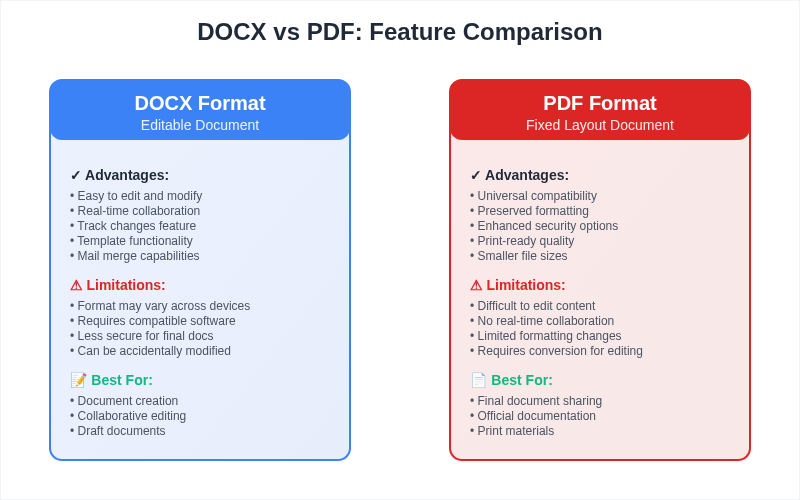
File Structure and Compatibility
| Aspect | DOCX | |
|---|---|---|
| File Type | Editable document | Fixed layout document |
| Software Required | Word processors (Word, Google Docs, LibreOffice) | PDF viewers (universal support) |
| Cross-Platform | Good (with format variations) | Excellent (identical rendering) |
| Mobile Support | Good (editing capabilities) | Excellent (viewing optimized) |
| Web Browser Support | Limited (requires plugins) | Native support |
Editing and Collaboration
DOCX Advantages
✅ Real-time collaboration with multiple users
✅ Track changes and comment system
✅ Easy content modification and restructuring
✅ Template reusability for consistent formatting
✅ Mail merge and automation capabilities
✅ Version control through built-in features
PDF Advantages
✅ Form filling capabilities
✅ Digital signatures and annotations
✅ Markup tools for review and feedback
✅ Page-level editing in advanced editors
✅ Comment threads and sticky notes
✅ Redaction for sensitive information
Security and Protection
DOCX Security Features
- Password protection for opening documents
- Editing restrictions with permissions
- Information Rights Management (IRM)
- Digital signatures for authenticity
- Metadata removal tools
- Document inspection features
Limitations:
- Easier to modify once opened
- Metadata can contain sensitive information
- Less robust protection overall
PDF Security Features
- Strong password encryption (up to 256-bit AES)
- Granular permissions (print, copy, edit restrictions)
- Digital certificates and signatures
- Redaction for permanent content removal
- Form field protection
- Audit trails for document access
Advantages:
- More secure for sensitive documents
- Harder to modify without detection
- Better for legal and official documents
When to Use DOCX Format
Ideal Use Cases for DOCX
1. Document Creation and Drafting
Best for:
- Initial document creation
- Content brainstorming and outlining
- Collaborative writing projects
- Template development
- Iterative editing processes
Example Scenarios:
- Writing reports, proposals, and manuscripts
- Creating marketing materials and brochures
- Developing training manuals and guides
- Collaborative research papers
- Internal company documentation
2. Collaborative Work
Perfect when:
- Multiple people need to edit simultaneously
- Track changes and comments are essential
- Version control is managed through the software
- Real-time collaboration is required
- Feedback integration is important
Workflow Benefits:
- Authors can see exactly what changed
- Reviewers can suggest edits without permanent changes
- Teams can work on different sections simultaneously
- Approval processes are streamlined
- Comment resolution tracking
3. Template-Based Documents
Ideal for:
- Standard business letters and memos
- Report templates with variable content
- Form letters and communications
- Recurring document formats
- Brand-consistent materials
4. Content That Requires Frequent Updates
Best suited for:
- Policy documents that change regularly
- Training materials with evolving content
- Project documentation with ongoing updates
- Living documents that grow over time
- Reference materials requiring maintenance
DOCX Format Advantages
Editing Flexibility
- Easy text manipulation - cut, copy, paste, and format
- Drag-and-drop elements and images
- Style management for consistent formatting
- Table and chart creation and modification
- Header and footer customization
Content Integration
- Multimedia support - images, videos, audio
- Chart and graph integration from Excel
- Hyperlink management for web and document references
- Equation editor for mathematical content
- Bibliography management for academic writing
Automation Capabilities
- Mail merge for personalized documents
- Macros for repetitive tasks
- Field codes for dynamic content
- Cross-references and table of contents
- Index generation for large documents
When to Use PDF Format
Ideal Use Cases for PDF
1. Final Document Distribution
Perfect for:
- Completed reports and presentations
- Official forms and applications
- Legal documents and contracts
- Published materials and brochures
- Archived documents for record-keeping
Why PDF Works Better:
- Guaranteed formatting consistency
- Professional appearance maintained
- Cannot be accidentally modified
- Universal accessibility without special software
- Print-ready quality assured
2. Official and Legal Documents
Essential for:
- Contracts and legal agreements
- Government forms and applications
- Financial statements and reports
- Compliance documentation
- Audit trails and official records
Legal Advantages:
- Digital signatures legally recognized
- Tamper-evident security features
- Long-term archival standards (PDF/A)
- Consistent evidence preservation
- Court-accepted document format
3. Print-Ready Materials
Ideal when:
- Precise layout control is crucial
- Color accuracy must be maintained
- Font embedding prevents substitution
- High-resolution images are required
- Professional printing is planned
Print Benefits:
- CMYK color support for commercial printing
- Embedded fonts prevent display issues
- Exact margin and spacing control
- Bleed and crop mark support
- Print optimization settings
4. Long-Term Archiving
Best for:
- Historical document preservation
- Regulatory compliance storage
- Reference material archiving
- Backup documentation
- Knowledge base creation
Archival Advantages:
- PDF/A format ensures long-term accessibility
- Self-contained files with embedded resources
- Consistent rendering regardless of software updates
- Metadata preservation for searchability
- Standard format widely supported
PDF Format Advantages
Universal Compatibility
- Cross-platform viewing without format issues
- Browser integration for web-based viewing
- Mobile optimization with responsive layouts
- Screen reader support for accessibility
- No software licensing required for viewing
Security and Control
- Document encryption with strong passwords
- Permission controls for specific actions
- Digital rights management (DRM)
- Watermarking for brand protection
- Redaction for sensitive information removal
Professional Presentation
- Consistent appearance across all devices
- High-quality printing with embedded fonts
- Interactive elements like forms and buttons
- Multimedia support including videos and audio
- Professional metadata for document information
Format Conversion Strategies
DOCX to PDF Workflow
When to Convert
- Document completion - finalized content ready for distribution
- Review phase - sending for approval or feedback
- Publication - making available for public access
- Archival - long-term storage requirements
- Printing - professional output needed
Best Practices for Conversion
- Review formatting before conversion
- Check fonts are properly embedded
- Verify images maintain quality
- Test hyperlinks functionality
- Validate accessibility features
PDF to DOCX Workflow
When to Convert
- Content reuse - adapting existing PDF content
- Translation projects - editing text for localization
- Template creation - using PDF as DOCX template base
- Collaboration - enabling team editing of PDF content
- Data extraction - pulling information for analysis
Conversion Challenges
- Layout complexity may not transfer perfectly
- Font substitution can affect appearance
- Image quality may be reduced
- Interactive elements might be lost
- Manual cleanup often required
Industry-Specific Recommendations
Business and Corporate
Use DOCX for:
- Internal reports and memos
- Collaborative project documentation
- Template-based communications
- Policy drafts and revisions
- Training material development
Use PDF for:
- External client presentations
- Official company announcements
- Signed contracts and agreements
- Annual reports and financial statements
- Marketing materials for distribution
Education and Academic
Use DOCX for:
- Research paper drafts
- Collaborative research projects
- Thesis and dissertation writing
- Course material development
- Student assignment submissions (when editing is required)
Use PDF for:
- Final paper submissions
- Course reading materials
- Academic presentations
- Research publication submissions
- Archival of completed work
Legal and Compliance
Use DOCX for:
- Contract drafting and negotiation
- Legal brief preparation
- Document template creation
- Collaborative legal research
- Internal legal communications
Use PDF for:
- Filed court documents
- Signed legal agreements
- Evidence preservation
- Compliance reporting
- Official legal correspondence
Healthcare and Medical
Use DOCX for:
- Research protocol development
- Collaborative clinical documentation
- Policy and procedure drafts
- Training material creation
- Internal medical communications
Use PDF for:
- Patient information forms
- Medical records archival
- Regulatory submissions
- Published medical literature
- Consent forms and legal documents
Technical Considerations
File Size and Performance
DOCX Characteristics
- Generally smaller file sizes for text-heavy documents
- Compression built into the format
- Resource sharing with linked external files
- Memory usage can be high during editing
- Loading time varies with document complexity
PDF Characteristics
- Predictable file sizes based on content
- Optimization options for different use cases
- Self-contained files with all resources embedded
- Fast loading for viewing applications
- Consistent performance across platforms
Accessibility Features
DOCX Accessibility
- Built-in accessibility checker
- Screen reader compatibility with proper markup
- Alt text for images and objects
- Heading structures for navigation
- Color contrast considerations
PDF Accessibility
- Tagged PDF structure for screen readers
- Alternative text for images
- Logical reading order control
- Form field labels for interactive elements
- Color independence for visual impairments
Future Trends and Developments
Emerging Technologies
Cloud-Based Collaboration
- Real-time co-authoring in both formats
- Version synchronization across devices
- Automated format conversion based on context
- AI-powered formatting suggestions
- Cross-format compatibility improvements
AI Integration
- Intelligent content suggestions
- Automated formatting optimization
- Smart conversion with layout preservation
- Content analysis and organization
- Accessibility enhancement automation
Format Evolution
DOCX Developments
- Enhanced multimedia support
- Better cross-platform compatibility
- Improved security features
- Cloud integration capabilities
- Real-time collaboration enhancements
PDF Innovations
- Interactive element expansion
- Better mobile optimization
- Enhanced security protocols
- AI-powered content analysis
- Improved accessibility standards
Best Practices and Recommendations
Document Lifecycle Management
Phase 1: Creation and Development
Use DOCX for:
- Initial content creation
- Collaborative editing
- Multiple revisions
- Template development
- Content organization
Phase 2: Review and Approval
Consider format based on:
- Review method preference
- Stakeholder technical capabilities
- Security requirements
- Feedback integration needs
- Approval workflow complexity
Phase 3: Final Distribution
Use PDF for:
- External distribution
- Official publication
- Print preparation
- Long-term archiving
- Legal documentation
Phase 4: Archive and Reference
PDF advantages:
- Long-term accessibility
- Format stability
- Self-contained preservation
- Search capability
- Consistent rendering
Decision Framework
Questions to Ask
-
Who will use this document?
- Internal team → DOCX often better
- External stakeholders → PDF usually preferred
-
What's the primary purpose?
- Editing and collaboration → DOCX
- Distribution and viewing → PDF
-
How important is formatting consistency?
- Critical → PDF
- Flexible → DOCX
-
What security level is needed?
- High security → PDF
- Standard protection → Either format
-
Will the content change frequently?
- Yes → DOCX
- No → PDF
Conclusion
Both DOCX and PDF formats have distinct advantages and ideal use cases. The choice between them should be based on your specific needs, workflow requirements, and intended audience.
Choose DOCX when:
- Content creation and editing are priorities
- Collaboration and real-time editing are essential
- Document will undergo multiple revisions
- Template-based workflows are used
- Accessibility and editing flexibility are important
Choose PDF when:
- Formatting consistency is crucial
- Final distribution to diverse audiences
- Security and document integrity are priorities
- Print-ready quality is required
- Long-term archiving is planned
Remember that you don't have to choose just one format. Many successful workflows use DOCX during the creation and editing phases, then convert to PDF for final distribution and archiving. Understanding both formats' strengths allows you to optimize your document management strategy and improve overall efficiency.
Frequently Asked Questions
Q: Can I edit PDF files like DOCX documents?
A: While PDF editors exist, they're not as flexible as DOCX editors. For extensive editing, convert to DOCX first, then back to PDF when finished.
Q: Which format is better for SEO and web content?
A: For web content, HTML is preferred. However, PDF files can rank well in search engines and are good for downloadable resources.
Q: Do both formats support digital signatures?
A: Yes, both support digital signatures, but PDF offers more robust and legally recognized digital signature capabilities.
Q: Which format takes up less storage space?
A: It depends on content, but DOCX files are often smaller for text-heavy documents, while PDF files have predictable compression.
Q: Can screen readers handle both formats well?
A: Both can be accessible when properly formatted, but PDF requires special attention to tagging and structure for optimal screen reader compatibility.
Ready to convert between formats? Use our free online converter to switch between DOCX and PDF formats while maintaining quality and formatting.